
Innhold Show
If you use Claude Code, check .claude/settings.local.json before your next commit. The “Yes, and don’t ask again” option can save the entire shell command to that file – including passwords, API keys and tokens in plain text.
Security company Apiiro found 104,185 public copies of this local settings file on GitHub. Of those, 1,122 contained a total of 1,379 items the researchers classified as real secrets. The findings included database passwords, cloud credentials, API tokens, private keys and root logins for public servers.
This is not merely a story about developers who should have looked more carefully before running git add. A coding tool that writes a secret into a file inside the project directory, then relies on one machine’s global Git configuration to keep it private, is not secure by default. If that file has ever been tracked, you need to clean it up now. Deleting it does not make an exposed key secret again.
How do secrets end up in a Claude Code file?
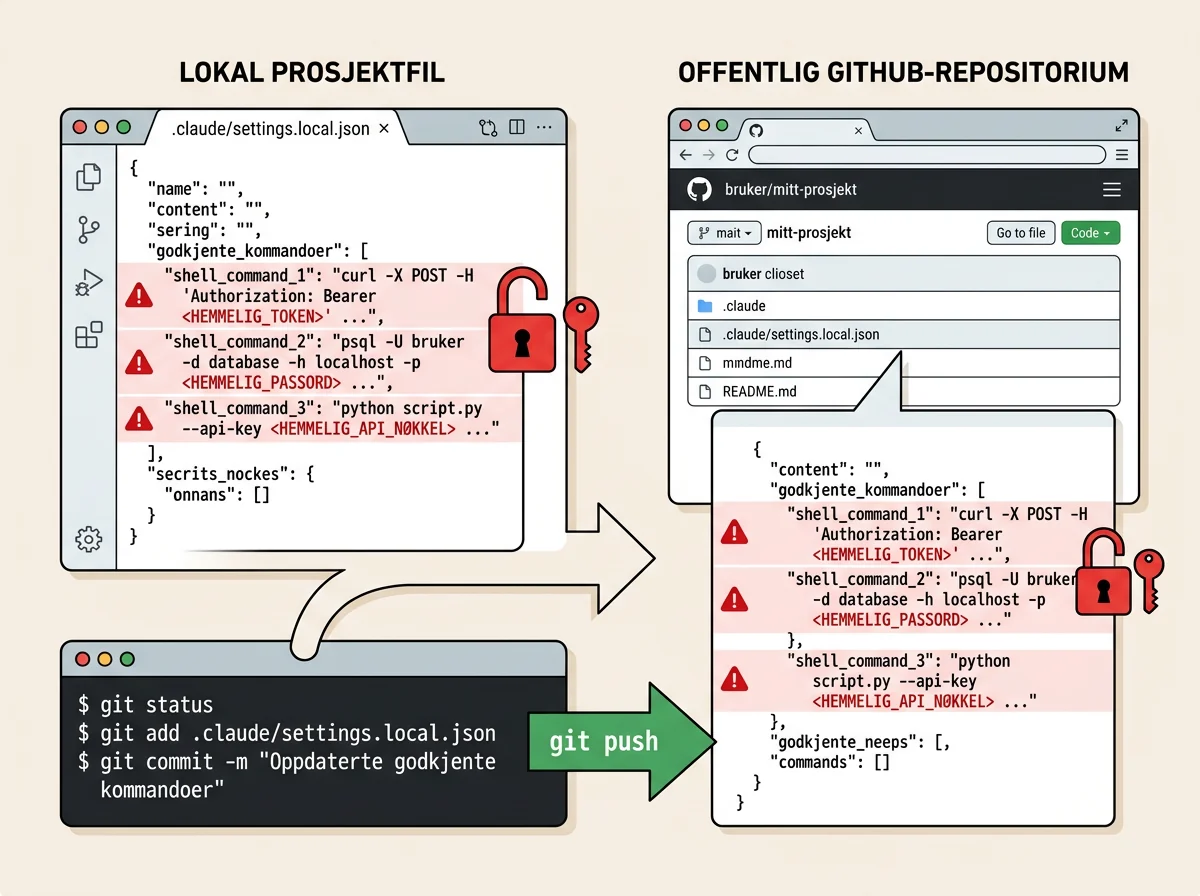
Claude Code can save an approved shell command as a permission rule when the user tells it not to ask again. If that command contains PGPASSWORD, a bearer token, a database password or an API key directly on the command line, the value can also be written to .claude/settings.local.json. Apiiro documented the mechanism and mapped the public files between November 1 and 3, 2026.
The user experience is exactly what makes this easy to miss. You ask the agent to inspect a database, run a migration or call an API. Claude Code proposes a long command, you approve it, and you choose not to be interrupted by the same kind of command again. The permission file may then remember more than your decision. It can remember the exact command, word for word.
Anthropic’s documentation describes settings.local.json as personal project settings that should not be shared with a team. The first time Claude Code writes the file inside a Git repository, it attempts to add the pattern to the user’s global Git exclude file. That helps on that machine, but it does not travel with the repository to another computer or container. It also does not protect a directory that becomes a repository later. If the file is already tracked, an ignore rule has arrived too late.
How extensive is the Claude Code leak?
Apiiro found 104,185 copies of .claude/settings.local.json across 103,617 public GitHub repositories. Among them, 1,122 files – about 1.1 percent – contained at least one secret under the researchers’ criteria. The 1,379 unique findings comprised 636 keys in recognized provider formats and 743 passwords or tokens associated with public hosts.
More than a third provided direct database access: 379 database passwords and 122 Supabase service-role keys. The researchers also found 103 Supabase account tokens, 43 SSH logins, 42 GitHub, GitLab or npm tokens, 23 AWS keys and six private keys. Sixty-three organizations were affected, ranging from student projects and small companies to established vendors.
The researchers did not use the credentials or test whether every key still worked. A “real secret” in this study meant that the value either matched a known key format or appeared alongside a public host after placeholders, default passwords, local hosts and intentionally public keys had been filtered out. That distinction matters. But you do not need proof that a stranger has already used your key before rotating it. Public exposure is enough.
The size of the permission file was also a strong warning sign. One in ten files larger than 8 KB contained a secret, compared with fewer than one in 500 files below 500 bytes. The more literal commands the file accumulates, the more opportunities there are for a password to slip into it.
Why is .gitignore not enough?
A global exclude rule protects only the development environment where that rule exists. It is not committed with the repository, so it does not follow the project when someone clones it on another machine. The same gap appears when an ordinary directory gets local Claude Code settings first and is turned into a Git repository later.
A repository-level .gitignore is better because it travels with the project, but it still does nothing for a file Git already tracks. Git continues tracking a known file even after its name is added to .gitignore. Apiiro found that a commit listing Claude as a co-author had modified the settings file in 539 of the 1,105 repositories with a secret where the researchers could trace this detail.
This security problem has also been visible for quite some time. A public bug report from December 2025 described API keys and tokens being stored in settings.local.json and ending up in a public repository. The report was closed as a duplicate, while Apiiro points to related warnings going back to August 2025.
The broader lesson is important: When an agent can both run commands and work with Git, you cannot simply assume that a file is “local” or that the agent understands what a stored command may expose later. The security boundaries have to be concrete, visible and testable.
Deleting the file does not revoke a leaked key
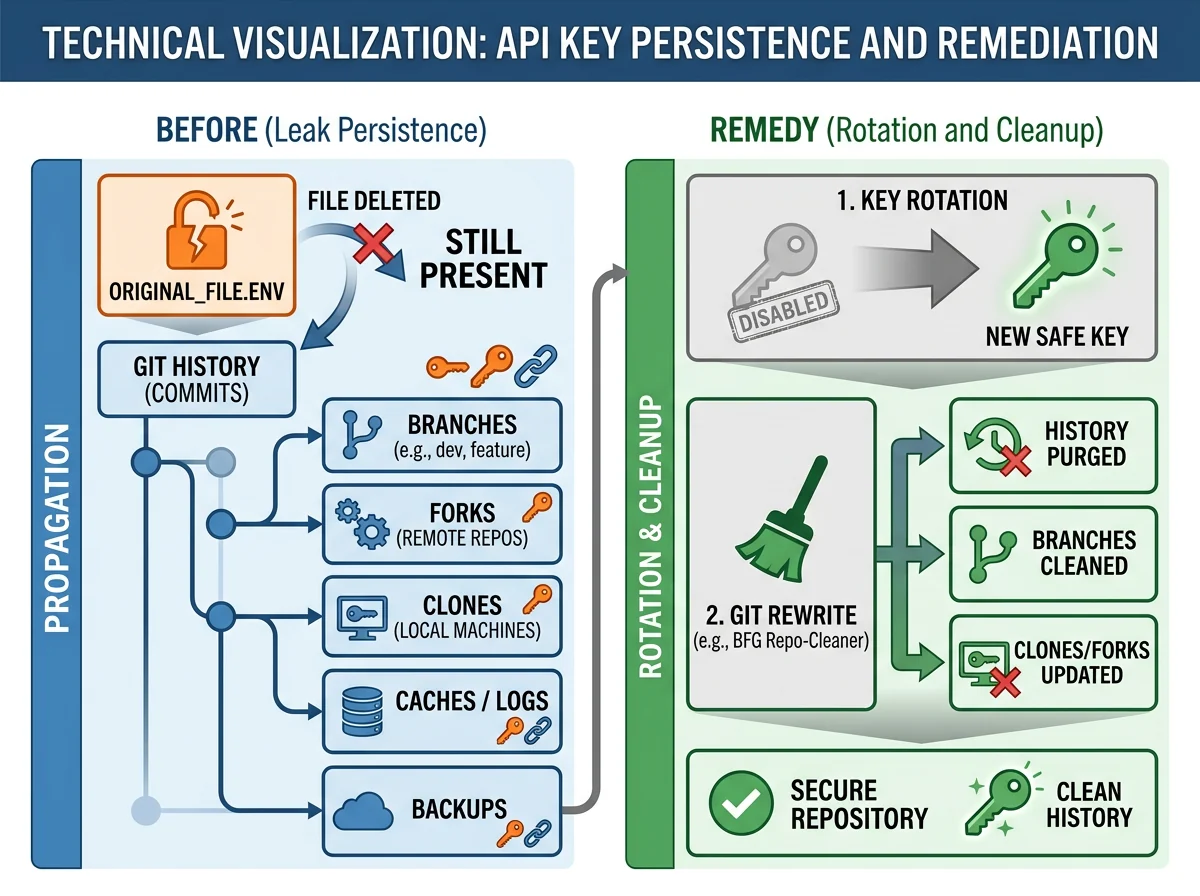
Apiiro found 734 secrets in older commits across 509 repositories where the values were no longer present in the current file. Another 211 forks of 74 repositories still carried the same secrets. Once a value has been committed, it may survive in history, clones, forks, caches and backups long after you remove the file from the main branch.
That is why the order of operations matters: Rotate the credential first. Replacing an API key or database password, or revoking a token, makes the exposed value useless. Only then should you remove the file from tracking, rewrite history where necessary and notify affected collaborators. Do not spend an hour making the Git history look tidy while a production credential still works.
Apiiro found 2,539 secrets across 1,994 public repositories when the researchers expanded the search to older Git history, shared settings.json files, agent transcripts, memory files and other notes. The problem is therefore larger than one Claude Code file. Coding agents create a growing collection of files that can look like harmless workspace clutter but may function as a record of commands, infrastructure and access.
What should you do now?
Start by searching for both .claude/settings.local.json and .claude/settings.json across your own and your organization’s GitHub repositories. Check the Git history as well. An empty search result on today’s main branch does not prove that the file was never published.
If you find a key, password, token or connection string in a file that has been public, treat the value as compromised. Rotate or revoke it immediately, then inspect logs and usage for signs of abuse. Do not begin by rewriting history while the credential remains valid.
Once the secret is useless, remove the local file from the Git index with git rm --cached .claude/settings.local.json and add it explicitly to the repository’s .gitignore. Clean the history where necessary, and remember that forks, clones and backups may still contain copies.
Stop placing secrets directly in shell commands as well. Retrieve them from environment variables or a secret manager so the permission rule can save $DB_URL instead of the database password itself. Where appropriate, approve bounded patterns such as Bash(npm run:*), not long literal commands with credentials baked into them.
Teams should treat agent directories such as .claude/, .cursor/ and .gemini/, along with transcript directories, as potential stores of sensitive data. Scan them before commits and in CI, but do not blindly trust standard scanners. Of the 1,122 local settings files containing classified secrets, 215 were not flagged by either gitleaks or TruffleHog. Passwords embedded in ordinary commands do not always resemble a conventional API key.
My verdict: This must be secure by default
Developers are obviously responsible for what they commit. That does not absolve the tool that creates the file. “Don’t ask again” sounds like a workflow preference, not consent to store a database password in plain text under the project root. When a file has a predictable name, lives inside the project and can be changed by the agent’s own workflow, its protection needs to survive more than the happiest possible Git setup on one machine.
Claude Code lead Boris Cherny said the team was considering measures including basic secret scanning and better handling in auto mode. That is necessary, but a built-in scanner cannot be the whole answer when two established scanners between them missed 215 files that Apiiro classified as containing secrets.
The practical lesson is simple: Agent files are code and security material, not invisible clutter. Inspect what they contain, decide which files may be tracked, and keep secrets out of commands the agent can save. If a key has been on GitHub, rotate it. Now.
Frequently asked questions
Which Claude Code file can contain passwords and API keys?
.claude/settings.local.json can contain literal shell commands saved as permission rules. If an approved command included a password, token or API key directly on the command line, the secret may have been stored with the rule.
Is adding settings.local.json to .gitignore enough?
No, not if Git already tracks the file. Remove it from the Git index, add it to the repository’s .gitignore, and inspect the history. If a secret was committed, rotate it even after deleting the file.
What should I do if an API key was public on GitHub?
Revoke or rotate the key first. Then inspect logs and usage for abuse, remove the file from tracking, clean the Git history where necessary and notify anyone affected. Deletion alone does not make the old key safe.
Do gitleaks and TruffleHog find every secret in Claude Code files?
No. Apiiro reported that neither tool flagged 215 of the 1,122 local Claude Code settings files containing classified secrets. Ordinary passwords inside shell commands often lack the recognizable patterns that secret scanners are designed to detect.