Innhold Show
VoxCPM2 and OmniVoice are two open-source AI text-to-speech models that you can run locally for free. VoxCPM2 delivers 48 kHz audio with impressive voice cloning, while OmniVoice supports more than 600 languages and includes non-verbal sounds. Both run on a 12 GB GPU and require no subscription.
I used VoxCPM2 for the narration in a 6-minute short film I produced. That gave me a practical view of what these models can actually handle – and where they start to fall apart. The result was good enough to surprise me. There are, however, a few things you should know before you begin.
This article is for anyone who wants a local alternative to a recurring ElevenLabs subscription, or who simply wants to know what open-source TTS could really do in 2026. I tested both models, compared their strengths, and collected the practical lessons from the production.
What are VoxCPM2 and OmniVoice?
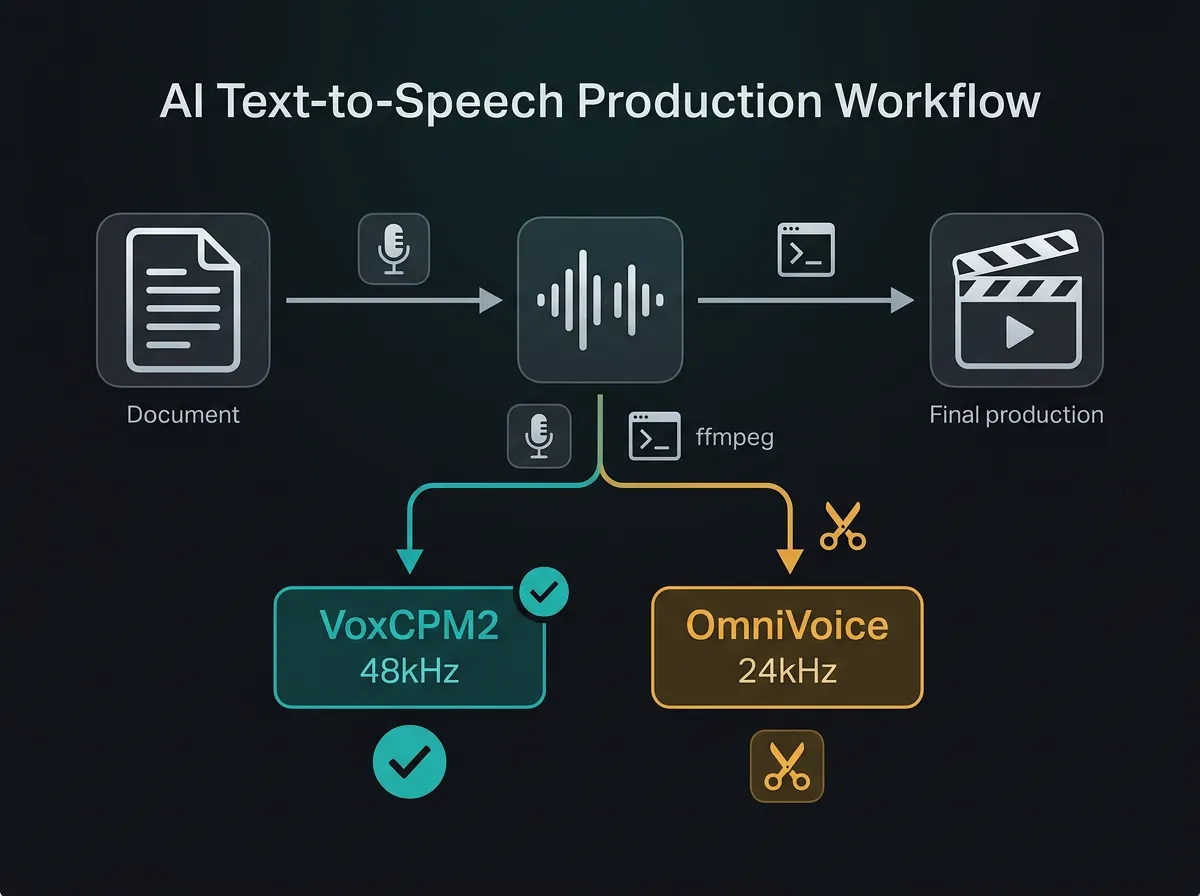
OpenBMB’s VoxCPM2 on Hugging Face is a 2-billion-parameter model built for high-quality speech synthesis. It can clone a voice from roughly 20 seconds of reference audio and produces 48 kHz output – the sample rate commonly used in professional film and studio production.
k2-fsa’s OmniVoice on GitHub takes a different approach: broad language coverage. It supports more than 600 languages and includes working non-verbal tags such as [laughter], [sigh], and [surprise-ah]. Its output is 24 kHz, which is sufficient for many speech-focused uses.
Both models are licensed for free use and run locally. Your audio files do not have to be sent to an external server, and there is no per-minute generation fee. Here is the result – a 6:24 short film in which VoxCPM2 provides all the narration:
48 kHz vs. 24 kHz – what does it mean in practice?
Sample rate affects how much audio detail a recording can preserve. A 48 kHz sample rate is standard in film and professional production. A 24 kHz sample rate is clear enough for speech, but it is not my first choice for a production that needs to sound good on proper speakers.
For a podcast, YouTube video, or short film, that difference matters. VoxCPM2’s 48 kHz output holds up well when mixed with music and sound effects. OmniVoice’s 24 kHz output tends to sound a little thinner in the same setting, although it is perfectly usable for instructional videos, e-learning, and content built around clean speech without a busy mix.
The short version is simple: choose VoxCPM2 when you want film-ready audio quality. Choose OmniVoice when broad language coverage and non-verbal expression matter more, even if that means accepting the lower sample rate.
How do I install them?
VoxCPM2 is straightforward to get running. Install the package, and the model downloads automatically the first time it is loaded:
pip install voxcpm
python -c "from voxcpm import VoxCPM2; model = VoxCPM2()"
For OmniVoice, follow the installation instructions in the GitHub repository. It needs a little more setup, but the process is well documented. You will also need Whisper to transcribe the reference audio correctly – that detail becomes important during voice cloning.
Both models run on a 12 GB GPU. An RTX 3080, RTX 4070, or a comparable card is enough to get started.
How does voice cloning work?
Voice cloning lets you give the model a voice reference and generate new text in that voice. VoxCPM2 needs about 20 seconds of clean reference audio. I used the result from my first attempt in the short film. It worked.
VoxCPM2 also has a voice-design feature. You describe the desired voice in parentheses directly in the text, for example: (A gruff older man with gravelly voice). The model interprets the description and adjusts the voice. Nice. You cannot combine voice cloning and voice design in the same run, though. It is one or the other.
OmniVoice uses the ref_audio parameter for voice cloning. One detail matters enormously: ref_text must be transcribed with Whisper, not typed from memory. I wrote it manually on my first attempt, and the result was noticeably worse than expected. Whisper large-v3 fixed it.
Can I use VoxCPM2 and OmniVoice for Norwegian?
Honest answer: usable, but not good – at least not straight out of the box.
VoxCPM2 clones the voice well in Norwegian, but speaks roughly 20% too fast. The practical fix is to slow the completed audio with ffmpeg:
ffmpeg -i input.wav -filter:a "atempo=0.85" output.wavOmniVoice was slightly better at Norwegian than VoxCPM2 in my test, but “better” does not mean “good.” The cloned voice is recognizable, yet the language itself sounds flat. The pauses, phrasing, and rhythm that make Norwegian sound Norwegian are missing. Open-source Norwegian TTS remained an unsolved problem in 2026.
Dialect did not work. I tested phonetic spelling to imitate a dialect, but the output drifted toward something that sounded vaguely like Nynorsk. Leave it alone.
If you need genuinely good Norwegian speech synthesis, ElevenLabs was still the safer choice when I ran this production. NB-Whisper is excellent for understanding Norwegian dialects, but that is speech recognition, not synthesis. It solves a different problem.
Weaknesses you should know about
Neither model is perfect. These were the most important limitations I encountered:
- VoxCPM2 and long passages: Text lasting 2 to 3 minutes or more begins to break down. The fix is segmentation. Split the script into chunks of about 1 minute and use the exact same reference-audio file for every chunk to keep the voice consistent.
*sigh*and*laugh*are spoken aloud: Asterisk syntax does not work in VoxCPM2. The model literally reads the asterisks and the word. If you need non-verbal sounds, OmniVoice is the better option.- OmniVoice and
ref_text: Always transcribe the reference audio with Whisper. My manual transcription produced a noticeably worse result, while Whisper large-v3 solved the problem. - Norwegian speaking speed: Both models spoke Norwegian too quickly. Applying ffmpeg
atempoduring post-production worked better than changing the speed parameter during generation, which reduced voice quality.
Non-verbal sounds were generally still an unsolved problem in open-source TTS in 2026. OmniVoice was the only one of these two models with working support, and even there the selection was limited to a small number of tags.
VoxCPM2 vs. ElevenLabs – is switching worth it?
At the time of this production, ElevenLabs offered better non-verbal control, richer emotional variation, and much better Norwegian. On pure quality, ElevenLabs was clearly superior.
But when you control the complete production workflow – segmenting the script, choosing the reference audio carefully, and handling post-production in ffmpeg – VoxCPM2 gets very close on English. I placed the narration from my short film under music and sound effects, and it held up well.
The right choice depends on what you need. If you want fast iteration with minimal post-production, use ElevenLabs. If you want full control, no cost per generated minute, and you are comfortable doing some technical work, VoxCPM2 is a genuine alternative.
This also fits into a wider field of AI-generated audio. I have written separately about making music with AI and about ACE-Step XL, a model that takes a very different approach to music generation.
Practical lessons from the production
These are the lessons I would carry into another long-form VoxCPM2 production:
- Always segment long scripts: Split the text into chunks of about 1 minute. Use exactly the same
ref_audiofile for every chunk to keep the voice consistent throughout the production. - Use Whisper large-v3 for synchronization: Transcribe the finished audio with Whisper before syncing it to video. That produces more accurate timing than doing it manually.
- Correct Norwegian speed with ffmpeg: Use
atempo=0.85as the final step. Do not slow the model during generation if preserving voice quality matters. - Choose the reference audio carefully: Use clear speech without background noise or excessive room sound. A cleaner reference produces better voice-cloning results.
Both models were available and ran on ordinary gaming GPUs when I completed the project. With a little patience and the right workflow, the amount of voice production you could do locally for free was genuinely impressive.
Frequently asked questions
How much GPU memory do VoxCPM2 and OmniVoice need?
Both models ran on a GPU with 12 GB of VRAM in my production context. Cards such as the RTX 3080 or RTX 4070 are suitable starting points, although the rest of the software environment and workload still affect practical performance.
Which model is better for English narration?
VoxCPM2 is my choice for English narration that must sit beside music and sound effects. Its 48 kHz output held up well in my short-film mix, especially after I segmented the script and kept the reference audio consistent.
Which model is better for non-verbal sounds?
OmniVoice is the better choice because it supports tags such as [laughter] and [sigh]. VoxCPM2 does not interpret asterisk cues such as *laugh*; it reads them aloud as text.
Can VoxCPM2 replace ElevenLabs?
For controlled English productions, it can be a real alternative if you accept more technical work and post-production. ElevenLabs remained better for Norwegian, emotional variation, non-verbal control, and fast iteration with less manual cleanup.