Innhold Show
If you connect Gmail or Google Photos to Google’s Personal Intelligence, information from those apps can now influence the ads you see. Google still says ads will not be based directly on your inbox or photo library. But summaries, excerpts and inferences that Search services create from that content may be used for advertising.
That is an important distinction, but it is not a reassuring one. You connect the apps to get better, more personal AI answers. Google is now opening the door for the output of that connection to feed its advertising machine as well. It is a price that can easily disappear behind phrases such as “personalization” and “more useful ads.”
The feature is optional, and Google says advertisers do not get access to your emails or photos. Even so, anyone who has enabled Personal Intelligence should check their settings. Saying yes to a smarter AI assistant should not quietly become the same thing as saying yes to more targeted advertising.
What did Google change in its privacy policy?
Google’s privacy policy, effective October 16, 2026, still says the company does not show personalized ads based on content from Drive, Gmail or Google Photos. It now adds an exception: That promise does not apply when you choose to make the data available to other Google services that support personalized ads. The Verge reported the policy change after it was spotted by Android Authority.
In its updated privacy policy, Google uses Search as the concrete example. Search can process data you have allowed it to access to personalize both content and ads. The old, simple boundary around Gmail, Drive and Photos has therefore become much more porous.
This does not mean Google automatically combs through every email or photo to build an advertising profile. The exception applies when you choose to connect content services to another Google service that can display personalized ads. In practice, Personal Intelligence is the crucial bridge between the two.
Google has not removed the word “choice.” It has changed what that choice can lead to. You may think you are granting Search or Gemini access to help with a trip, a purchase or an appointment. The same processed information can then help determine the advertising shown around the answer.
How can Gmail and Google Photos influence ads?
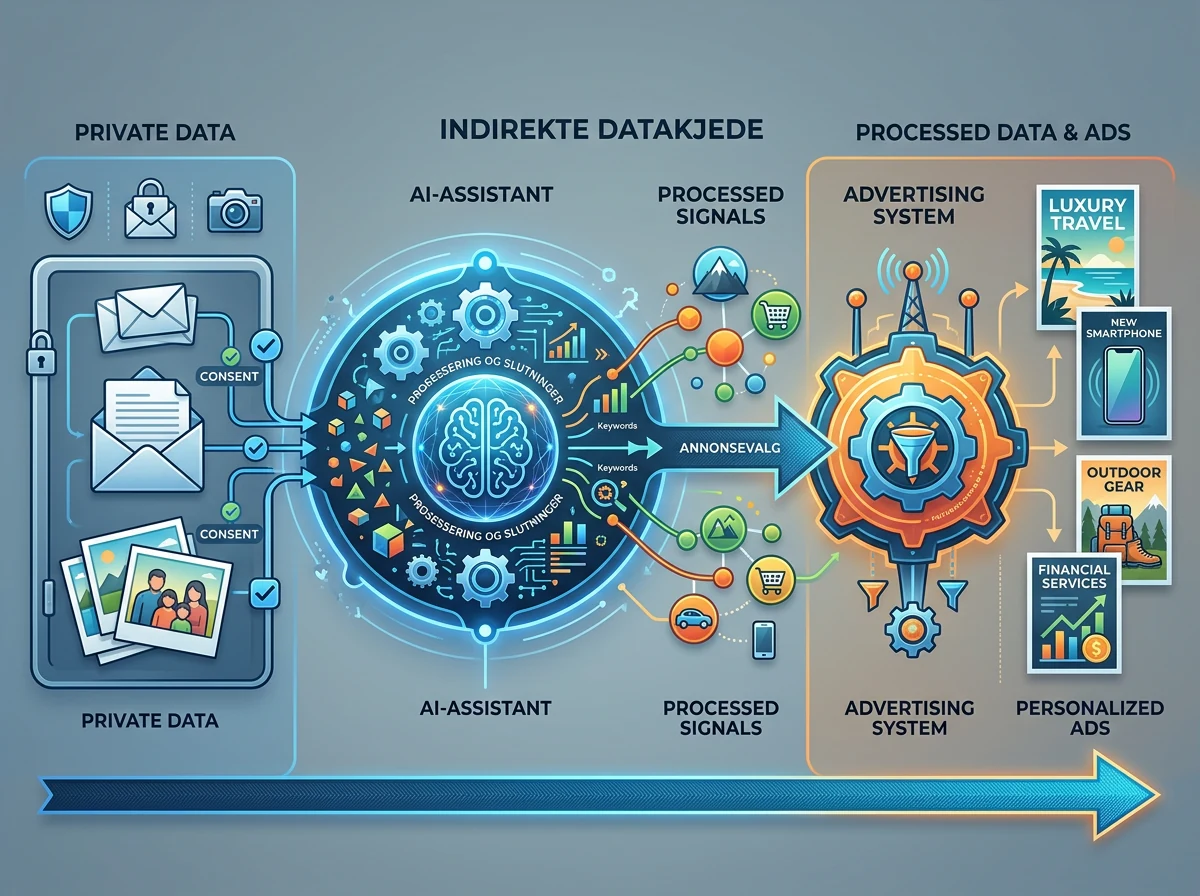
Google describes an indirect chain. Search can retrieve summaries, excerpts and inferences from Gmail or Google Photos to give you a more personal answer. According to Google’s help page for connected content apps, that same processed information may also be used to show ads.
Imagine asking AI Mode for restaurant suggestions on a trip. Personal Intelligence could find the hotel booking in Gmail and memories from earlier journeys in Photos. Search would then know something about where you are going, when you will be there and what you may like. Google says the ad is not based directly on the email or photo itself, but information extracted from that content can still shape both the answer and the advertising.
This is where the word “directly” becomes extremely convenient for Google. It offers the user little comfort that the advertising system receives an inference from an email instead of the email word for word. The information still originated in private content you stored in Gmail, and it can still affect what Google tries to sell you.
Google says it does not use sensitive categories such as health, religion, sexual orientation or ethnicity to personalize ads. The company also says advertisers do not gain access to your inbox or Google Photos library. Those are important limits, but they do not change the central point: Private content can acquire a commercial purpose once you connect it to Search services.
What is Personal Intelligence?
Personal Intelligence connects Gmail and Google Photos to Google’s AI services, including AI Mode in Search, so the AI can use your own context in its answers. Google brought the feature to AI Mode on January 22, 2026. Connecting content apps is optional, and you decide which apps to connect.
The idea is that you should not have to explain everything from scratch. In Google’s introduction to Personal Intelligence in AI Mode, the company gives examples involving travel planning, shopping and recommendations based on Gmail reservations and memories in Photos. The appeal is obvious. An assistant that knows your itinerary and preferences can provide much more relevant answers than a conventional search engine.
That is precisely why the privacy boundaries need to be crystal clear. The more useful the assistant becomes, the more tempting it is to connect your entire digital life. And the more Google knows about the relationship between your plans, purchases and interests, the more valuable that information becomes to its advertising business.
Two different forms of consent are being blended together here. Giving an AI access to one email so it can answer a specific question is one thing. Letting information from that email influence ads is another. When both are wrapped into the same personalized experience, it becomes far too easy to agree to more than you intended.
Is Google reading your entire inbox for ads?
No. There is no evidence that Google scans your entire Gmail inbox or Photos library to select ads. The change concerns data you choose to make available to other Google services, and Google says ads will not be based directly on the contents of your inbox or photo library.
But “Google does not read the whole inbox for ads” must not become a distraction. The company’s own help text explicitly says Search can use summaries, excerpts and inferences from connected apps, and that this processed information may also be used for advertising. There is a real connection between private content and ad personalization, even when that connection passes through an intermediate layer.
It is also important to distinguish between what an advertiser sees and what Google uses. Google says advertisers cannot view Gmail or Photos. That can be completely true while Google’s own systems still use information derived from the content to choose an ad. The advertiser does not need to know where the signal came from to benefit from the targeting.
This is not a story about strangers suddenly opening your family photo album. It is a story about purpose creep. Content connected to improve AI answers can also become part of the machinery that finances Google.
What should you check in your Google Account?
If you have used Personal Intelligence in Search, first check which content apps are connected. Open Search Services Personalization in your Google Account, go to Personalized Recommendations, then Additional Personal Intelligence and Connected Content Apps. From there, you can disconnect Google Workspace and Google Photos. The labels may differ depending on your account language.
Google says the settings for Search services are changing, so their names and locations may look slightly different in your account. The important part is to find the connection between Search services and your content apps, not merely the general advertising switch.
If you do not want personalized recommendations in Search, you can turn them off entirely. You can also review ad personalization in My Ad Center. These are separate choices: Limiting personalized ads is not necessarily the same as disconnecting Gmail and Photos from Personal Intelligence, and disconnecting the apps does not necessarily disable ad personalization elsewhere.
Pay attention to your history as well. Google says disconnecting an app or deleting content from that app does not delete data already stored in Search Services History. That data may still be used for product improvement, including training generative AI models. If you want to clean up what has already been stored, you therefore need to review and, if appropriate, delete that history too.
This is about trust, not just a switch
Google has followed a familiar recipe perfectly. First comes a feature that is obviously useful. Then more services are connected. Finally, the advertising use appears in a privacy policy that very few people read. Every step is optional, but every yes moves the boundary a little further.
The integration across Google’s services is its biggest advantage over standalone AI products. It is also its biggest privacy challenge. Gmail and Photos are not simply two apps in a list. They may contain years of bookings, photographs, relationships, purchases and plans. That depth of context is what makes Personal Intelligence useful – and what makes commercial reuse of its output so significant.
Making the connection optional and reversible is the bare minimum. Choice only works when people understand what they are agreeing to. “Better personal answers” is not an adequate description if the same underlying information may also influence the advertising around those answers.
My recommendation is simple: Connect Gmail and Photos to Search only if the benefit is genuinely worth this trade for you. If you believed Personal Intelligence used the content solely to help you, review the settings now. Google has written the exception into its rules. Take the company at its word.
Frequently asked questions
Does Google use Gmail directly for targeted ads?
Google says no. Ads are not supposed to be based directly on your Gmail inbox or Google Photos library. However, when you connect those apps to Search services, summaries, excerpts and inferences derived from the content may be used to personalize the experience and show ads.
Is Personal Intelligence enabled automatically?
No. Google describes Personal Intelligence and the Gmail and Photos connections as optional, with the connections off by default. You choose which apps to connect. If you enabled the feature earlier, it is still worth checking which apps and Search services currently have access.
Can advertisers read my emails or see my photos?
Not according to Google. Advertisers are not supposed to receive access to your Gmail inbox or Google Photos library. Google’s own advertising system may nevertheless use processed information from connected apps as a signal when deciding which ad to show.
Is disconnecting Gmail and Photos from Search enough?
No. Disconnecting the apps stops future access through that connection, but it does not delete information already stored in Search Services History. Review connected apps, personalized recommendations, My Ad Center and stored Search history separately if you want to limit or remove the data.