Innhold Show
Gemini API Tool Retrieval lets an AI agent fetch full tool schemas only when it needs them, instead of carrying the entire toolbox in every request. For agents with large function libraries or several MCP servers, that can mean less context, lower latency, and fewer tools for the model to sort through at once.
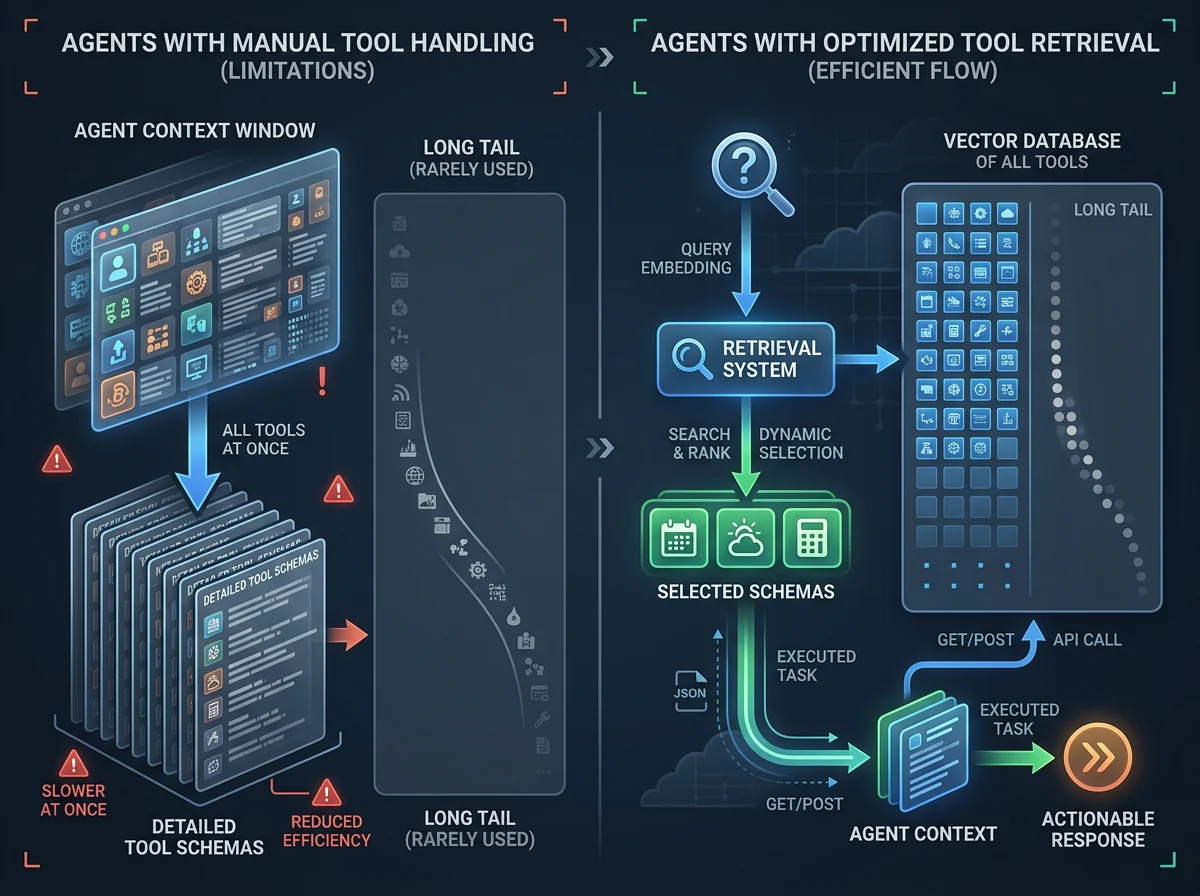
This solves a very ordinary agent problem. Every tool arrives with a name, description, parameters, and rules that the model must read before doing anything useful. Once the library grows to dozens or hundreds of tools, the agent spends an increasing share of its context on options that have nothing to do with the task in front of it.
I like this direction. APIs and tool calls are what turn a model into something more useful than a talkative text box, but a large toolset should not make every single task heavier. This is still a preview feature in a beta API, however. It is not proof that every agent will suddenly become faster or more accurate. That gain has to be measured in the actual system.
What is Gemini API Tool Retrieval?
Tool Retrieval is a new feature in the Gemini Interactions API that lets the model search for a suitable tool and load its complete parameter schema on demand. According to Google’s announcement on November 19, 2026, it is designed for agents with dozens or hundreds of available tools.
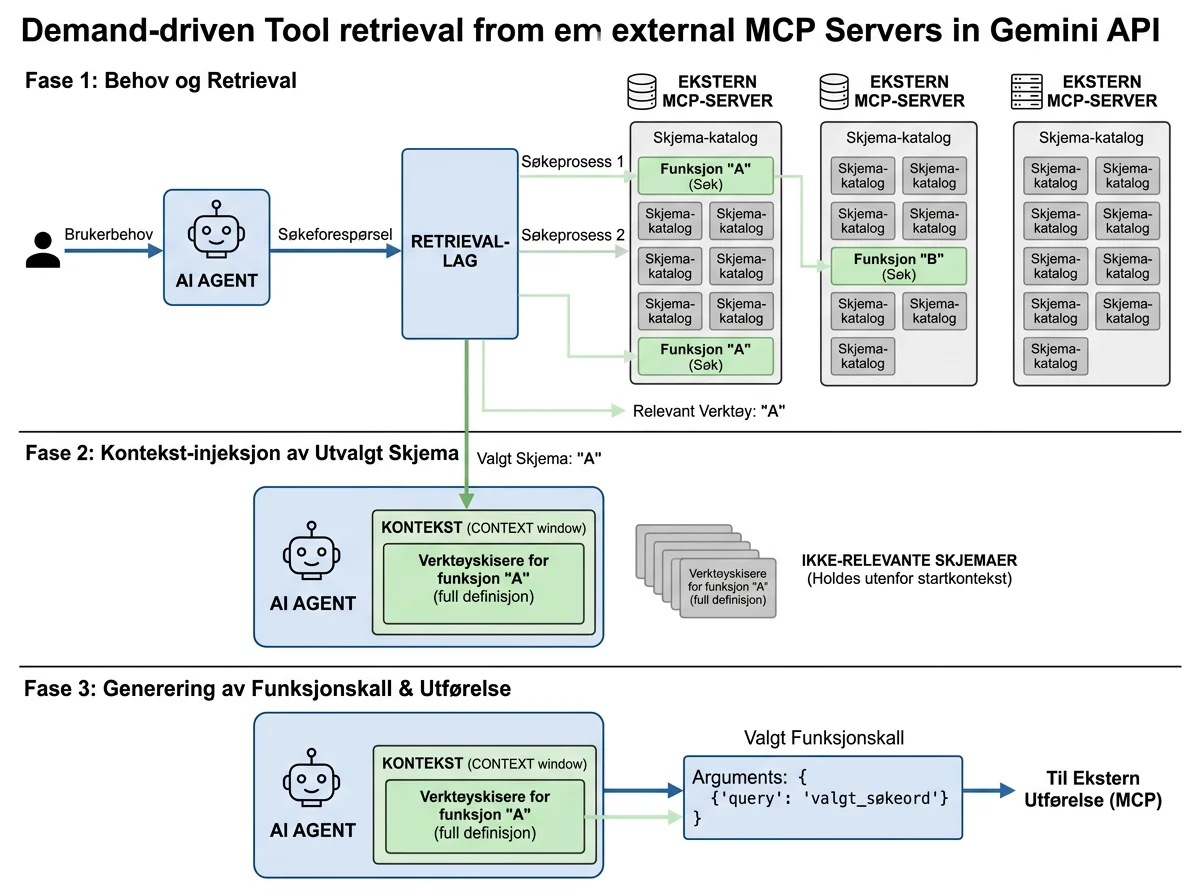
The model still sees the names and descriptions of deferred tools. That gives it enough information to know which capabilities exist. The larger parameter schemas stay outside the initial context until the model decides that a particular tool is relevant.
With server-side retrieval, the search, schema loading, and function call can all happen within the same API request. The response includes separate tool_search_call, tool_search_result, and function_call steps. Developers can therefore inspect what the model searched for and which schema it received before normal function calling continues.
That is different from asking a model to choose from a long list it has already been given. Tool Retrieval limits the amount of detailed tool information in the working context. It resembles retrieval for documents, except that the objects being fetched are function definitions.
Why do large toolsets become a problem?
A single tool schema may be small, but dozens of declarations can consume tens of thousands of input tokens in every request, according to Google’s technical documentation. Those tokens still have to be processed when the agent needs only one simple function.
The cost is not limited to the API bill. A larger prompt takes time to process, consumes part of the context window, and gives the model more candidates to distinguish. Google says tool-selection accuracy declines as the candidate list grows. That makes sense: an agent looking at 100 similar names has a harder sorting job than one that receives the three relevant schemas.
This is also why I do not see Tool Retrieval as a universal switch that everyone should enable. Google recommends ordinary static loading for fewer than roughly 20 stable tools. In that situation, the model avoids the retrieval step and the entire setup remains easier to understand and debug.
The feature becomes genuinely useful when the toolbox has a long tail: a few functions are used constantly, while many specialist functions are needed only occasionally. The common tools can stay in the context. The rest can be marked with defer_loading: true and loaded only when the task calls for them.
How does server-side retrieval work?
Server-side retrieval is the default mode and requires two specific changes. The request must include {"type": "tool_search"}, and every function tool that should remain deferred must have defer_loading: true. Gemini then performs the search on Google’s side.
The advantage is that there is no extra round trip between the model and the application. When Gemini needs a deferred tool, the API retrieves the schema internally and continues to a function call in the same request. Developers do not have to build or operate a separate index.
That is the easy option, but it is not magic. Names and descriptions still have to be precise enough for the model to find the correct function. If five tools are all described as “get data,” the retrieval layer has very little to work with. A short_description can provide a compact search description, while the full description follows the schema once the tool is loaded.
The documentation also says that exactly one tool_search tool is allowed per request. If you set defer_loading without a server-side tool_search, the API returns a 400 error. It is a small detail, but exactly the kind that can save a developer an unnecessary round of swearing.
When should the application control retrieval?
Client-side retrieval fits applications that already have their own tool registry, embedding index, or per-user access rules. Set execution to client, and the agent calls a search function that the application executes itself.
The application returns complete tool definitions as a function_result. Those tools do not have to be declared in the original request. This makes it possible to expose new tools halfway through a conversation, perhaps after the user connects an integration or receives a new role.
The price is an additional round trip for every search. Server mode performs retrieval internally within one API call, while client mode waits for your code to find and return the results. That is a reasonable trade when custom permissions, naming rules, or security filters matter more than the lowest possible latency.
This may be the most interesting architectural distinction. Server mode is a practical default for a large, fixed library. Client mode gives the application control over which tools each user is allowed to discover. Retrieval can therefore become more than token economy; it can also sit between what the agent wants and what the application actually permits.
What does Tool Retrieval mean for MCP servers?
Tool Retrieval supports remote MCP servers in the Gemini API. A developer can set defer_loading: true on the mcp_server tool itself, which allows all tools exposed by that server to load on demand. That is much cleaner than pulling the entire catalog into the initial context.
This is especially relevant when one MCP server exposes dozens of functions, or when an agent connects to several servers at once. Without retrieval, an open standard interface can become a remarkably efficient way to fill the prompt with schemas. With retrieval, the integrations remain available without every implementation detail following every request.
Google executes the call to a remote MCP server when the selected function belongs to that server. Local functions still return as ordinary function_call steps for the application to execute. The response exposes both types, so developers can still follow the chain.
I would not connect a large MCP server and assume the work is finished. Good names, precise descriptions, minimal permissions, and logging remain necessary. Retrieval reduces how much the model must read at once. It does not decide whether a tool should be allowed to delete a database.
Does Tool Retrieval cost extra?
Tool Retrieval has no separate per-use fee. Google charges input and output tokens at the normal rate for the Gemini model in use. tool_search adds a small fixed block of input tokens, and every schema actually retrieved is billed as input for the rest of the conversation.
The saving does not appear automatically in every call. It occurs when the schemas that never load are larger than the retrieval overhead plus the schemas the model does need. That is a good starting assumption for large libraries with many rarely used tools. With ten small functions, the calculation may just as easily go the other way.
The feature can be combined with prefix caching. Deferred schemas are absent from the start of the prompt, while retrieved schemas are appended later in the conversation. The cached prefix can therefore remain identical from one turn to the next instead of changing according to which tools became relevant.
Google does not publish a universal percentage for token savings or lower latency. Good. Such a figure would be almost meaningless without the number of tools, schema sizes, and usage pattern. Measure at least input tokens, response time, and incorrect tool selections before and after the change. Otherwise, you know that retrieval exists, not that it helps.
Which limitations should developers know about?
Tool Retrieval is in preview and requires the v1beta version of the API. It works in the Interactions API, not the older generateContent method. Google lists support for Gemini 3.6 and newer models, including all Gemini 4 models.
The API surface may change before general availability. I would therefore put the integration behind a clear abstraction in my own code instead of scattering tool_search-specific assumptions throughout the application. Preview means the feature is ready to use and measure, but maintenance comes with the package.
For multi-turn conversations, the complete tools list must be sent again with every request, even when using previous_interaction_id. The Interactions API preserves the step history, but it does not automatically carry every tool declaration forward. Omitting tools can make the model continue trying to call functions it no longer sees as declared.
Tool Retrieval does not solve the quality of function calling itself. A model can still choose the wrong tool, provide bad arguments, or misunderstand the task. The feature gives the model a more manageable set of schemas; it does not make execution infallible. Tool selection is a problem in its own right, not a footnote to the language model.
Who should try the feature now?
Developers with large and reasonably stable tool libraries are the clearest audience. If an agent has fewer than roughly 20 simple tools, static loading remains the natural starting point. If it has 50, 100, or more functions, server-side retrieval is worth comparing with the current setup.
Applications with their own registries and user-dependent permissions should consider client mode. The search can then respect tenant, role, subscription, and connected integrations before the model sees the complete schema. The downside is an additional round trip and more code to operate.
I would begin by keeping the most frequently used and latency-sensitive tools static while deferring the long tail. Then I would log which tools retrieval finds, how many schemas it loads, and whether the agent actually makes better choices. It is a small, controlled change that can be reversed if the results do not hold up.
Google has already introduced narrower APIs for agent work, including the Gemini Decisions API for fast, bounded choices. Tool Retrieval tackles a different layer: how a general agent navigates a large action space without receiving the entire instruction manual on every turn. It is not the sort of feature that looks spectacular onstage. In a real agent architecture, it may be far more valuable.
My preliminary verdict is positive and practical: this is a sensible way to scale toolsets, especially alongside MCP. But do not turn a preview into a production gain on faith. Use it where the library is genuinely large, keep a simple control group, and let the measurements decide.
Frequently asked questions
Do I need to build a search index for Gemini Tool Retrieval?
No, not in server mode. Gemini searches the declared tools on Google’s side and loads the schema within the same API request. A separate index is useful in client mode, where the application controls search, access, and which tools can appear.
Does Tool Retrieval work with every Gemini endpoint?
No. The feature requires the Interactions API and the beta v1beta version. It is not supported by generateContent. During preview, Google lists Gemini 3.6 and newer models, including the Gemini 4 family, as supported.
Is Tool Retrieval useful for a small set of functions?
Usually not. Google recommends static loading for fewer than roughly 20 stable tools. Retrieval makes more sense when large schemas and many rarely used functions would otherwise fill the context and make tool selection harder.
Can Gemini retrieve tools from an MCP server on demand?
Yes. Set defer_loading: true on a remote mcp_server tool. Its tool schemas then remain outside the initial context and load when the model needs them. Permissions, logging, and safe execution still have to be handled as before.