Innhold Show
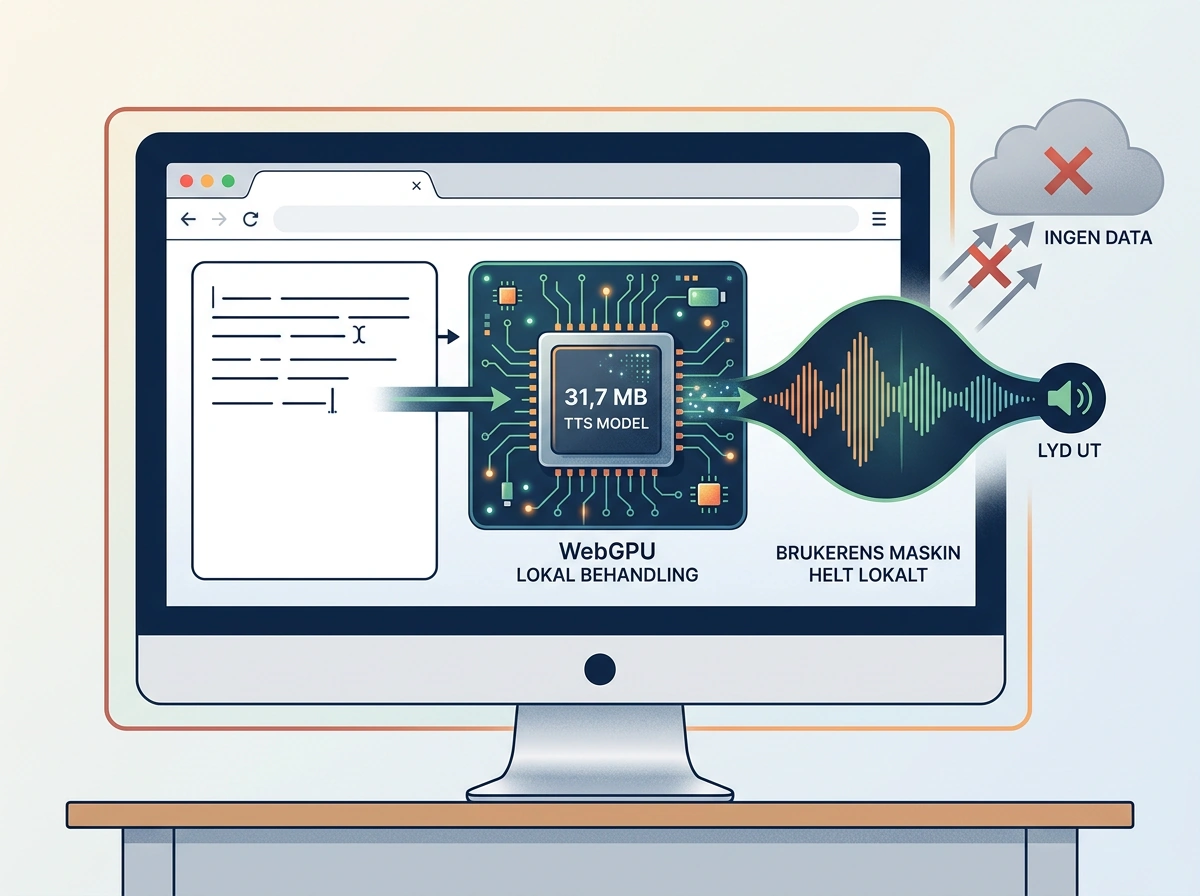
Woof is a 31.7 MB text-to-speech model that runs locally in the browser. Underdog wrapped it in a small retro game, but the real news is that speech generation happens on your own machine instead of a server somewhere else.
You type a sentence on a virtual typewriter, press Enter and hear it spoken aloud. Underdog says the model has 30.7 million parameters, uses WebGPU in the browser and can keep working without an internet connection once it has loaded. It is a wonderfully concrete example of just how small local AI is becoming.
The demo also includes music, but there is an important distinction: Woof is the text-to-speech model. Underdog says all the voices and songs in the experience were created offline by local models. It does not say that this same 31.7 MB model generates both speech and music.
What is Woof?
Woof is Underdog’s compact text-to-speech model. It has 30.7 million parameters and a stated download size of 31.7 MB. In Underdog’s Escape demo, the model runs directly in the browser through WebGPU and reads aloud whatever the user types.
Text-to-speech converts written text into audio. That is the opposite of speech-to-text, which transcribes something a person says. The distinction may sound obvious, but things quickly become muddled when the broad term “speech model” is used for both directions.
Underdog calls Woof a “frontier” model. That is the company’s label, not an independent verdict on quality. I have not seen a public model report with broad comparisons of naturalness, pronunciation, language support and voices that would establish that Woof matches the best cloud-based voice services.
What can be established is more practical, and frankly more exciting: 31.7 MB is small enough for the complete model to be delivered as part of a browser experience. That moves text-to-speech away from a remote API and into software already running on your device.
What does the browser demo show?
Escape is presented as a small game set in a room with a typewriter, CRT monitor, lamp and radio. TechCrunch describes how you can type on the typewriter and have Woof speak the text, while a dial on the radio plays different pieces of music.
Underdog also emphasizes that the voice runs on the user’s own GPU through WebGPU. Browsers without WebGPU display a message saying that Woof cannot speak there. This is not merely a video of a model running on a developer’s machine. The website itself is designed to load the model and perform speech generation locally.
The company says Woof can also run 18 times faster than real time on one laptop CPU thread. That is a vendor claim without a published test setup in the material I have seen, so I regard it as a promising signal, not a finished independent benchmark.
The music is a separate part of the demonstration. Underdog says the song examples were generated locally, mostly on an M5 Max with 48 GB of memory, while one example is labeled M5 with 48 GB. Generation times range from about 39 to 131 seconds. Those figures describe the music clips, not Woof’s speech speed. Mixing the two would make the tiny model appear to do something Underdog has not actually claimed for it.
Why does a 31.7 MB model matter?
A 31.7 MB model is small enough to make downloading, startup and local storage far less demanding than speech AI measured in hundreds of megabytes or gigabytes. It opens the door to speech in apps, accessibility tools, games and local assistants without sending every sentence to a cloud service.
That can reduce latency and network use. More importantly, it gives the user more control over the data. If the text is processed and the speech is generated locally, a script, private note or conversation does not have to leave the device just to be read aloud. That is a real benefit, not decoration for a specification sheet.
Local execution also means the feature can continue working when the connection is unreliable or completely unavailable. Underdog built the story around a fight against the intrusive “Darkcloud,” and yes, the message is about as subtle as a brick through a window. At least the company made a demo in which the point can be tested by disconnecting from the internet after everything has loaded.
A small model is not automatically a good model, however. Download size tells us little about pronunciation, rhythm, voice quality, language coverage or stability over long passages. It also does not reveal how much working memory the model and its runtime require. Woof shows that local speech can be packaged very compactly. It does not yet prove that every larger model is unnecessary.
Is Woof open and ready for commercial use?
Underdog describes Woof as open weights, but associates those weights with CC BY-NC 4.0. The “NC” means noncommercial. It is therefore misleading to read “open” as permission to put the model straight into a paid product. The stated license permits sharing and adaptation with attribution, but not commercial use without additional rights.
That can still be useful for students, hobby projects, research and prototypes. A business planning to integrate Woof into customer service, a paid app or another commercial product needs to review the rights before adopting the model. This is not a minor footnote. It determines whether a technically promising component actually fits the project.
The public material does not provide a complete production guide either. I found no clear compatibility matrix covering browsers and hardware, no published price for commercial rights and no general release date for the complete Underdog app. The demo proves the concept in the environment Underdog built. That is not the same thing as a production-ready platform agreement.
This is the difference between an impressive technical demonstration and a component you can drop directly into a product. Woof has delivered the first part. Documentation, rights, integration details and predictable performance still need to follow before businesses can treat it as ordinary infrastructure.
What do we know about voice quality and Norwegian?
The source material does not document how Woof handles Norwegian pronunciation, dialects, names or intonation. Underdog’s demo lets a user enter text, but a demonstration of English speech is not a Norwegian quality test. I have not conducted my own listening test of the model either.
A language listing would not be enough on its own. A meaningful Norwegian evaluation would need to test this exact model on Norwegian sentences, numbers, abbreviations, compound words and preferably pronunciation that reflects more than one dialect. Human listeners should be involved, rather than relying only on automated transcription to see whether the words can be recognized.
It is therefore too early to recommend Woof as a Norwegian voice engine. The honest verdict is that its size and local browser execution are impressive, while language coverage and voice quality remain insufficiently documented. The absence of a Norwegian test is not a negative result. It is simply a limit on what the available evidence allows me to claim.
The same restraint applies to general quality. A voice can sound intelligible in short sentences and still struggle with long paragraphs, pauses, emotion or unusual names. Until Woof has independent listening tests and a clear language overview, the demo should be read as evidence of efficient local execution, not victory in every other category.
How does Woof fit Underdog’s local AI strategy?
Woof does not stand alone. A few weeks earlier, Underdog released Bark 3.0, a speech-to-text model for local transcription. The official model card lists a 163 MB download and describes an English speech-recognition model built for uses including meetings and dictation.
Together, Bark and Woof cover opposite directions. Bark turns audio into text, while Woof turns text into audio. They are building blocks for a local voice assistant that can both hear and answer without sending the entire conversation to the cloud. That combination is more interesting than a single entertaining retro game.
Underdog also has larger language models and a waitlisted app. The underlying idea is the same: more AI should run on devices people already own. When the model, runtime and interface can be packaged together, local AI becomes accessible to people who have no desire to fight dependencies in a terminal.
Woof also shows that the browser can become a delivery environment for local models, rather than merely a window onto a cloud service. WebGPU lets a website use the device’s GPU, while the model can be downloaded like any other resource. That can make distribution much easier, although developers must still account for browser support, memory use, download time and licensing.
My verdict on Woof
I like this. Not because a retro demo with an evil cloud is a finished product, but because Underdog has made the model’s most important quality visible: Woof is small enough to move ordinary speech generation into the browser and keep it on the user’s device.
The strongest numbers are 31.7 MB and 30.7 million parameters. The claimed speed of 18 times real time is promising too, but it needs a reproducible test. At the same time, the noncommercial license reduces the model’s immediate usefulness for businesses, and the lack of documented language and voice quality means nobody should present this demo as a finished victory over larger TTS systems.
Still, the direction is easy to see. Local speech does not have to be a heavyweight specialist system or an API bill that ticks upward with every sentence. It can become a small component bundled with an application, available offline and able to keep the text on the device. Woof is not the complete answer yet. But 31.7 MB is a pretty clear hint.
Frequently asked questions
Can Woof run without an internet connection?
Yes, according to Underdog, Woof runs locally in the browser and can continue offline after the required files have loaded. The demo uses WebGPU on the user’s device. However, Underdog has not published a complete browser and hardware compatibility list.
Does Woof generate both speech and music?
No. Woof is the text-to-speech model. The Escape demo also includes locally generated music, but Underdog says the voices and songs were made by local models in the plural. The music generation figures should not be treated as measurements of Woof’s capabilities or speed.
Can Woof be used for free in a commercial app?
Not under the stated CC BY-NC 4.0 terms. The license permits noncommercial sharing and adaptation with attribution, but commercial use requires other rights or a separate agreement. A business should settle the license before integrating the model into a paid product.
Does Woof work well in Norwegian?
That is not known yet. The available sources do not document Norwegian support or listening tests covering pronunciation, dialects and intonation for this model. I have not tested Woof myself, so a positive or negative verdict on its Norwegian quality would be unjustified.