
Innhold Show
If you already pay for an eligible ChatGPT Pro or Business plan, you can now claim up to $500 in OpenAI API credits per billing period. For developers and small businesses that use ChatGPT while also building apps or agents, this is a proper subscription benefit – not another decorative badge on the pricing page.
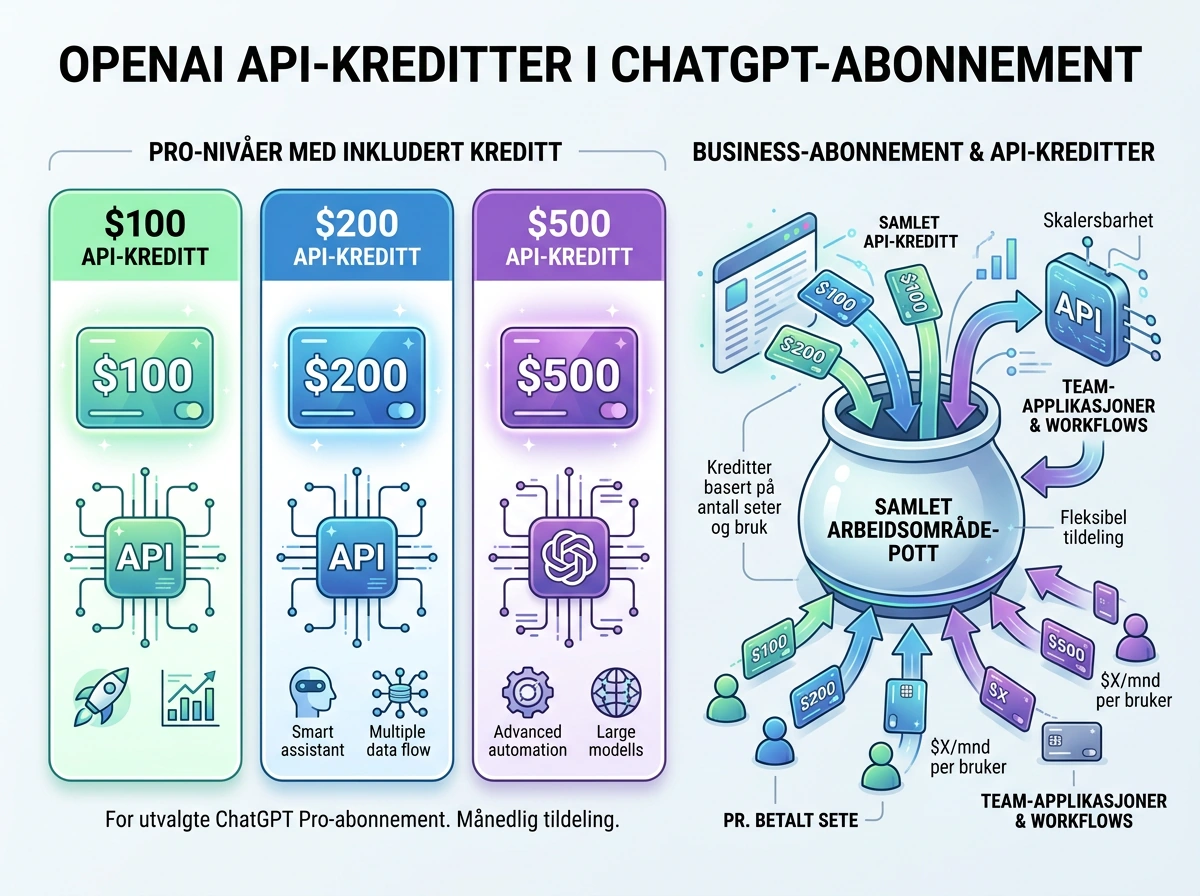
OpenAI has effectively connected part of the subscription to its API platform. Pro customers on the $100, $200, and $500 tiers can receive the same amount in API credits. Eligible Business customers receive credits for each paid seat, pooled at workspace level. You still have to claim the benefit and link it to one API organization.
There is some important fine print. The credits expire, they do not roll over to the next billing period, and they do not increase your usage limits in ChatGPT or signed-in Codex. I still like this direction. When people already pay a lot for a subscription, giving them a real API budget is far more useful than locking all of the value inside one chat interface.
Who qualifies for ChatGPT API credits?
The benefit covers Pro 100, Pro 200, and Pro 500, along with eligible ChatGPT Business workspaces that have paid Standard or Premium seats. OpenAI’s terms for the API credit benefit explicitly exclude Plus, free trials, Enterprise, Edu, and legacy Codex seats.
An eligible subscription normally has to be active for at least seven days before the credits can be claimed. Having the right plan is not enough on its own: You must complete the activation and confirm that the grant has appeared in the selected API organization.
For Pro, the same person must own both the subscription and the API organization receiving the credits. For Business, the person activating the benefit must own both the ChatGPT workspace and the API organization. An ordinary member account or administrator role may not be sufficient.
How much are the credits worth?
The Pro plans receive an API credit grant matching the plan’s monthly price: $100, $200, or $500. This is a usage budget for the OpenAI API. It is not cash, it cannot be withdrawn, and it does not reduce the price of the ChatGPT subscription itself.
Business Standard provides $20 per paid seat, while Business Premium provides $100 per paid seat. The amounts are pooled across the workspace, but a monthly Business subscription can receive no more than $500 in each billing period. Five Standard seats and three Premium seats, for example, produce a combined $400 API credit grant.
Annually billed Business workspaces can receive the full annual grant at once, capped at $6,000 for the annual billing period. The first grant is prorated according to the time remaining in the period. The same principle applies when a monthly subscription activates the benefit partway through its billing cycle.
What can you use the OpenAI credits for?
The credits cover eligible paid usage billed to the linked API organization. That includes Responses, Chat Completions, Agents, Decisions, GPT-Live, Realtime, image generation, and built-in tools with their associated usage and storage costs. OpenAI’s developer guide explains both activation and which API services are covered.
That makes the benefit genuinely useful. You could use the grant to try an internal document assistant, process customer requests, build a small image tool, or run an agent without adding a separate API bill for the first experiments. For a small business, $100 or $500 may be more than enough to validate an idea before it needs a budget of its own.
It is also a welcome push from chatting to building. I have long liked APIs because they let you put models into your own workflows instead of doing everything manually in one window. If you already have an eligible subscription, I would activate the credits and put them toward one tightly scoped task with measurable value.
This does not give you more ChatGPT or Codex usage
The API credits do not raise your ChatGPT limits, add more signed-in Codex usage, or increase the credit balance inside a Business workspace. OpenAI still treats ChatGPT subscriptions and API billing as separate systems. The promotional balance is added only to the API organization linked during activation.
OpenAI also says the benefit does not cover Codex usage through API keys. It is easy to read “API credits” as a universal balance for everything OpenAI sells, but it is not. Treat it as a grant for the eligible services on the standard OpenAI API platform, subject to the coverage listed in the terms.
A seat in ChatGPT Business does not automatically grant access to the API organization or its projects either. Team members need that access separately. A business should therefore decide who owns the link, which projects may spend the credits, and how usage will be tracked before everyone starts experimenting at once.
How do you activate the API credits?
You can start activation from ChatGPT or the API Platform. A Pro owner can open Settings and Billing in ChatGPT. A Business owner can open workspace billing or the admin center. If the account is eligible, the API credit benefit should appear there.
You then select the API organization that will receive the grant and confirm the link. The ChatGPT account and API account must use the same email address. If you have several organizations, stop and check before clicking: One eligible subscription or workspace can be linked to only one API organization, and an organization can have only one active link of this type.
After activation, open the billing overview in the API Platform and check Credit grants. A completed link does not necessarily mean the credits have already been issued. If nothing appears, verify the age of the subscription, the account email, ownership permissions, and the organization you selected.
The credits expire – use them deliberately
Monthly grants expire at the end of the subscription’s billing period and do not carry forward. That makes the offer less valuable to anyone who never uses the API, but much more useful to people who already have a workflow or a small project to try. An unused balance is still worth zero, however impressive it looks in the billing dashboard.
Promotional credits are consumed before API credits you have purchased yourself. When the promotional balance is gone, API calls continue against a purchased balance if one is available. With no balance remaining, requests fail with HTTP 429 and the error code credit_balance_exhausted. The grant does not remove rate, token, model, organization, or project limits.
The answer is not to burn through the balance just before it expires. Set a modest spending cap, measure what one completed task costs, and expand only when the result saves time or creates value. I would treat the credits as a monthly development budget, not as permission to let an agent run wild without controls.

OpenAI is following Anthropic’s playbook
OpenAI did not invent this particular benefit. Earlier in October, Anthropic gave subscribers on its $100, $200, and $500 Max and Team tiers equivalent amounts of expiring API credit. Simon Willison highlighted the close similarity when OpenAI launched its version on October 29.
The competition is not hard to spot. Expensive chat subscriptions have traditionally been one product, while API usage arrived on a separate bill. Now that both major providers are using subscriptions to fund API experiments, it becomes easier to move a good idea from the chat window into an actual app or agent.
That is healthy competition for customers. The old dividing line between a chat subscription and API usage is becoming less rigid. You should still choose a provider based on the task and the total cost, but included credits can change the calculation quite a bit for a service you already pay for.
What does this mean for developers and small businesses?
For developers, the grant lowers the barrier to testing ideas that would otherwise remain on a list. For a small business, it can fund a controlled pilot using internal documents, support data, or existing procedures. That is more useful than chasing a random demo because the value can be measured against work the business already performs.
But nobody should buy a $500 subscription solely because it includes $500 in API credits. The grant is a benefit attached to an expensive subscription, not a rebate that makes the subscription free. It expires, cannot be withdrawn, and the offer can be changed or withdrawn later.
If you already have the right plan, my advice is simple: Activate the credits, link them to the correct organization, and give one concrete project a clear budget. The value is not the number displayed in the billing panel. The value is getting a useful piece of work done that would otherwise have cost you money.
Frequently asked questions
Do ChatGPT Plus subscribers receive API credits?
No. OpenAI says Plus does not qualify. The offer covers Pro 100, Pro 200, Pro 500, and eligible Business workspaces with paid Standard or Premium seats. An eligible subscription normally must have been active for at least seven days before the credits can be claimed.
Do unused OpenAI API credits roll over?
No. Monthly credits expire at the end of the applicable billing period and do not roll over. Annually billed Business customers receive an annual grant that expires at the end of the annual period. The initial allocation may be prorated for the time remaining.
Can the credits be used for more Codex usage?
No. The credits do not increase signed-in Codex or ChatGPT limits, and OpenAI says they do not cover Codex usage through API keys. They apply only to eligible paid services billed through the linked OpenAI API organization.
Do I need a payment card to use the promotional credits?
No, not while an active promotional grant covers the usage. OpenAI says you can use the grant without adding a separate API payment method. When the balance is exhausted, requests stop unless the organization has purchased credits or automatic recharge available.