
Innhold Show
Grok Bot Data Bot makes the data team’s knowledge available across a company without routing every question through a data analyst. Employees can ask questions in plain language, let the bot query approved tables and receive an analysis, chart or dashboard. That could remove a lot of waiting, especially in small and midsize businesses where one or two people often hold almost all the data knowledge.
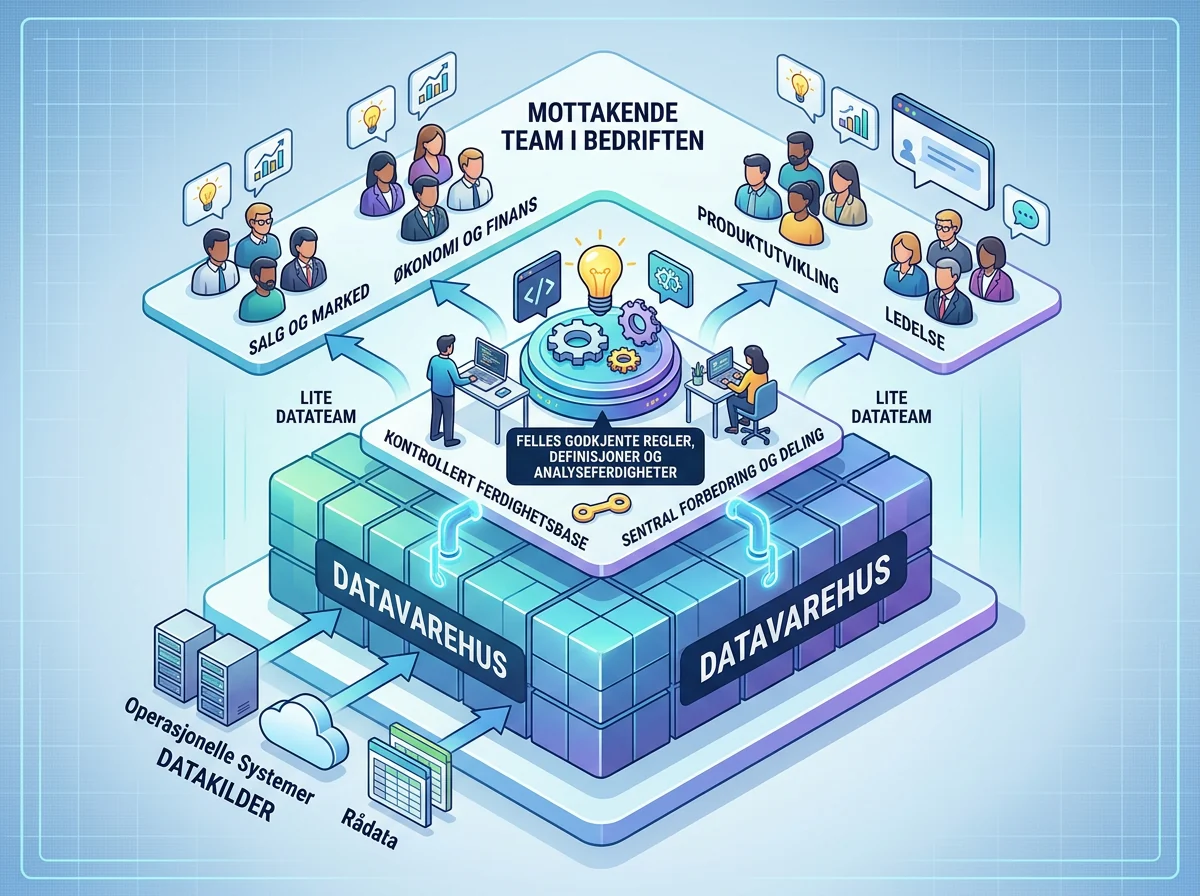
The clever part is not merely that an AI agent can write SQL. Plenty of tools can do that already. xAI’s setup uses shared skills containing the company’s own definitions, controlled access to data sources and memory managed by the people who understand the data. When the data team improves a skill, everyone using the bot gets the same improvement.
I like this direction. Experts no longer have to answer the same question for the fifth time, while everyone else gets a shorter path from question to useful answer. But this is the company’s own case study, not an independent test. Give a bot the wrong definition of an “active customer” and it will simply deliver the wrong answer faster, with a prettier chart.
What is Data Bot in Grok Bot?
Data Bot is a shared Team Bot equipped with the data team’s working methods as reusable skills. According to xAI’s presentation of Data Bot, it can query a data warehouse, perform analyses and adapt the result to the person asking. It can also work in Slack and handle follow-up questions in the channel where the team already works.
A normal personal bot is limited by what its owner knows and has given it. Data Bot instead draws on a shared knowledge base maintained by the data team. That is an important difference. The company is not just moving a chatbot closer to its data. It is turning domain definitions and proven working methods into a shared service.
This builds on Team Bots, which bring context, tools, permissions and memory together in one agent. The earlier Grok Bot usage-limit problem showed why the surrounding controls matter as much as the agent itself. Data Bot shows what a role-specific agent can become when a professional team manages both its knowledge and its boundaries.
The real value is in shared skills
The skills describe how the bot should work, not just which tables it can see. The data team can add definitions for key metrics such as active users and revenue, identify the source tables, supply query logic and set rules for investigating anomalies. Before blaming a product change for a drop, the bot might first check the region, customer segment, holidays and changes to event logging.
The same principle applies to experiments. Skills can cover A/B tests, power calculations, selection bias, exposure checks and reporting once a test has enough data. Separate skills can govern charts, dashboards, dbt models, pipeline alerts and event instrumentation. This professional recipe is what makes the system more interesting than “ask your database a question.”
xAI says its data team teaches Data Bot through shared skills for metrics, experiments, charts, dashboards and data engineering. That also tells us something important: the useful result is not free. Clean data, consistent definitions and documented methods have to exist before an agent can reuse them.
What can ordinary business teams do with it?
Product managers can investigate how a feature is actually being used without opening an analytics tool or filing a request with the data team. In xAI’s example, a product manager gets an answer within minutes and can continue asking questions in the same conversation. The result can be a concise finding with a chart rather than a large report nobody has time to read.
Marketers can go beyond email opens and clicks. Data Bot can receive a campaign ID, connect the recipients to events in the data warehouse and check whether they actually used the feature or changed plans. That is far more useful than celebrating a pretty click-through rate without knowing whether the campaign changed anything.
The agent can also take on an entire analysis workflow. It can make a plan, query the warehouse, investigate possible explanations and deliver a report with charts or a dashboard in Hex. In Slack, it can monitor a metric, post a weekly update and investigate an unexpected movement when someone asks what happened.
This starts to look like an actual colleague rather than a chatty search box. Even so, the data team must still decide which sources the bot can access, which methods it should use and when a human has to take over. The point is to distribute good data practice, not to distribute unrestricted database access.
Controlled memory matters as much as data access
Data Bot has shared memory for knowledge discovered during day-to-day work. It can remember who owns a particular pipeline or that an earlier fall in a metric was caused by a regional holiday. The next time a similar anomaly appears, it can check that explanation before pointing to a product change.
The crucial detail is that a new memory does not automatically become truth for the entire company. xAI says Team Bot managers can approve or reject proposed memories before they are shared. That is a sensible model. A casual answer in Slack should not become permanent company knowledge just because an agent happened to see it.
The official documentation for skills and routines also recommends defining when a skill should be used, which data and permissions it needs, how the result should be verified and which actions require approval. It says a learned workflow should be tested on a safe example before it is automated. That is less exciting than a product demo, but far more important in production.
Seventy hours is promising, but it is not a final answer
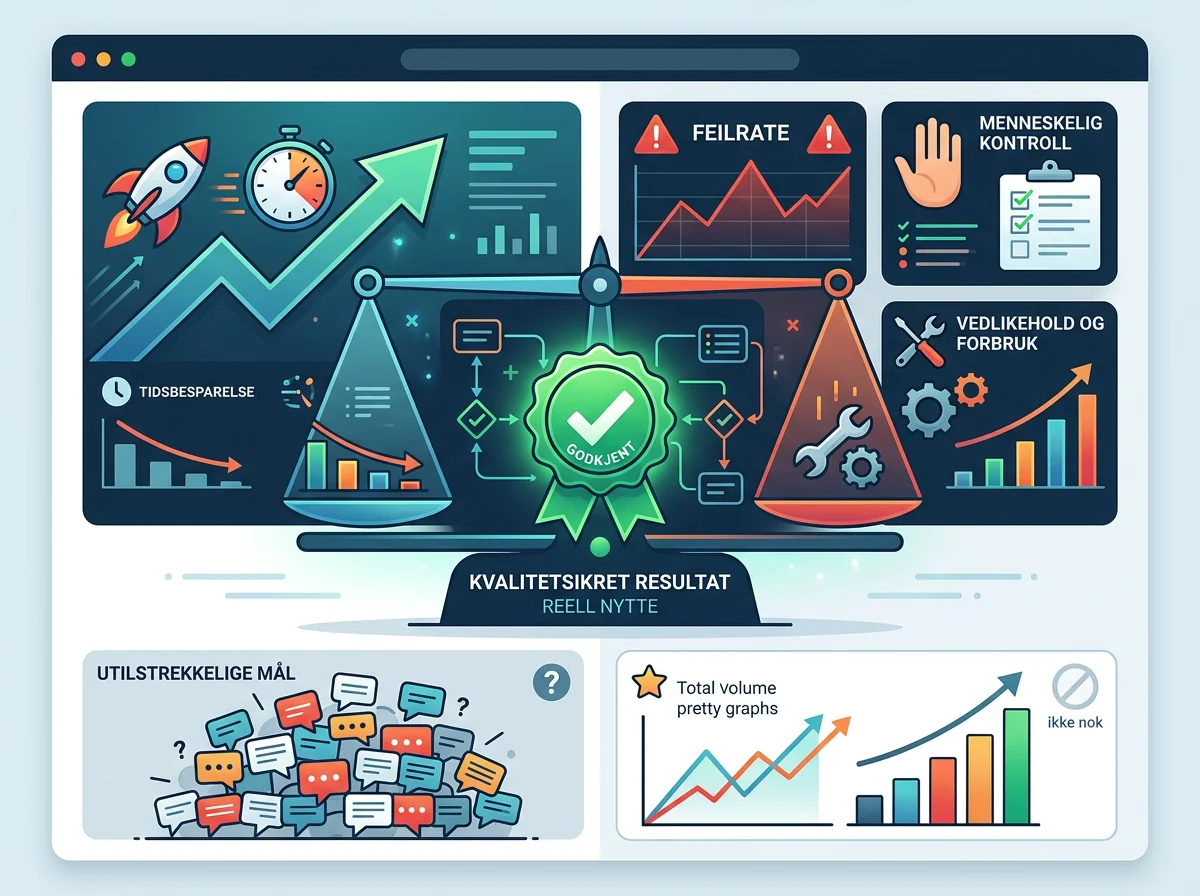
xAI estimates that Data Bot handled about 70 hours of work in one week that would otherwise have landed with the data team. That is a promising internal number, but it is not an independent measurement of 70 net hours saved. The time spent creating skills, checking answers, maintaining permissions and correcting errors belongs in the calculation too.
The right measure is not how many messages the bot answers. Measure how many tasks end with an analysis the experts can actually approve, how often someone has to correct it and how much time the system consumes in maintenance. A dashboard made in three minutes is not a gain if an analyst spends an hour finding out why its numbers are wrong.
Costs need the same scrutiny. Grok Bot uses a weekly allowance and may continue with paid overage after the limit is reached, depending on the plan and settings. xAI does not list a separate fixed price for Data Bot in the source material, so a business should check its plan, usage limits and spending controls before allowing the agent to run heavy analyses automatically.
What should be in place before a company tries it?
Start with one narrow workflow that the data team already understands well. Give the bot read-only access to a limited set of approved tables, define one or two key metrics and decide exactly how the result will be checked. Only after the answers hold up should the skill be shared more widely or turned into a scheduled routine.
Access control is not decoration around the product. xAI says Data Bot queries its warehouse, while the Grok Bot administration documentation recommends starting new roles with read-only tasks and draft outputs. For security-sensitive deployments, it also recommends controls including network policies, connector review, Auto Review and explicit approval for production changes, external email, payments and legal terms.
The company also needs to be comfortable with the data model. The Grok Bot FAQ says the product requires cloud storage and does not support Legacy Privacy Mode. An analysis agent may have access to some of a company’s most sensitive information. Pressing “connect” and hoping the defaults happen to fit is not a security plan.
My recommendation is simple: build the skill before you build the automation. Document the definitions, use read-only access, have experts approve new memories and measure the quality of completed analyses. Once that works for one limited task, the bot can get more responsibility. Not before.
The data team becomes the teacher and quality gate
Data Bot does not remove the need for professional judgment. xAI says its data team still handles complex analyses and learns where the agent needs more guidance. The role partly shifts from answering every individual request to defining methods, controlling shared knowledge and improving the agent that everyone uses.
That is a sensible division of labor. A scarce expert should not spend time retrieving the same weekly figure for the sixth time. The expert should work on questions where the data is ambiguous, the consequences are significant or the answer requires genuine judgment.
If xAI can deliver that without losing control, Data Bot is one of the more concrete examples of what shared AI agents can do for a business. It is not magic. It is not a data scientist in a box. It is a practical way to make a small expert team’s knowledge available to more people, all the time.
Frequently asked questions
Can Data Bot replace a data analyst?
No. Data Bot can handle repeated questions and well-defined analyses, but it still needs experts to define metrics, grant appropriate access, approve shared memories and take over complex decisions. xAI says its data team continues to do the work that requires deeper judgment.
Can Grok Bot connect to Slack and a data warehouse?
Yes. Data Bot can participate in Slack channels, answer questions and run scheduled updates. xAI says it can query the warehouse, conduct analyses and return reports with charts or build a dashboard in Hex.
Is Data Bot suitable for a small business?
Potentially, especially where a small data team receives the same questions repeatedly. Start with one bounded analysis task and check plan limits, cloud-storage requirements, access controls and review effort before making the bot available across the company.
What should a company measure in a Data Bot pilot?
Measure completed analyses that experts can approve, the correction rate, time spent on review and maintenance, total usage cost and the number of requests the data team no longer has to handle. Message volume and attractive charts reveal very little about the real return.